
To clean a Dyson vacuum, first, unplug the device. Then, empty the dustbin and wash the filters.
Regular maintenance of your Dyson vacuum ensures optimal performance and longevity. Cleaning your vacuum involves simple steps that remove dust, debris, and allergens, enhancing its suction power. Start by detaching and emptying the dustbin to prevent clogs. Next, rinse the filters under cold water to eliminate trapped particles.
Allow the filters to dry completely before reinstalling them. Check for blockages in the hose and brush bar, and remove any tangled hair or fibers. These steps help maintain your vacuum’s efficiency, ensuring a cleaner home. Regular cleaning can also extend the lifespan of your Dyson vacuum, making it a worthwhile investment.
Introduction To Dyson Vacuum Maintenance
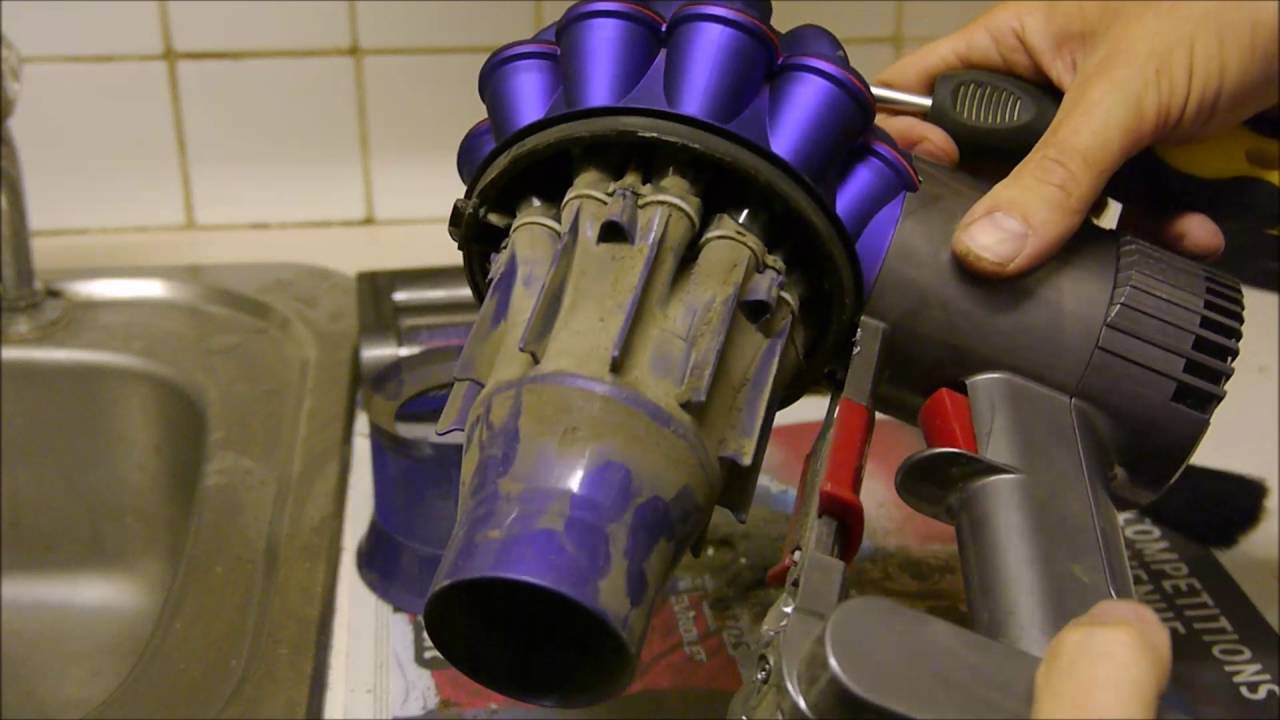
Dyson vacuums are known for their powerful suction and innovative design. To keep your Dyson vacuum performing at its best, regular maintenance is essential. This guide will help you understand the importance of cleaning your Dyson vacuum and the tools you’ll need.
The Importance Of Regular Cleaning
Regular cleaning ensures your Dyson vacuum works efficiently. Dust and debris can clog the filters and affect performance. Cleaning your vacuum can extend its lifespan. A well-maintained vacuum will provide better suction power. It will also improve the air quality in your home. Regular cleaning can prevent costly repairs in the future.
What You’ll Need
Before you start, gather the necessary tools. Here’s a list of what you’ll need:
- Soft brush
- Microfiber cloth
- Screwdriver
- Warm water
- Mild detergent
With these tools, you can clean your Dyson vacuum effectively. Always make sure to unplug the vacuum before cleaning. Follow these steps to ensure a thorough cleaning process:
- Remove the canister and empty it.
- Wash the filters with warm water.
- Use a soft brush to clean the brush bar.
- Wipe the exterior with a microfiber cloth.
- Reassemble the parts carefully.
Following these steps will keep your Dyson vacuum in top condition. Regular maintenance is simple and keeps your vacuum running smoothly. Enjoy a cleaner home with a well-maintained Dyson vacuum.
Identifying Your Dyson Model
Cleaning a Dyson vacuum correctly requires knowing your model. Different models have different cleaning methods. Identifying your Dyson model is crucial for effective maintenance.
Different Models, Different Methods
Dyson vacuums come in various models. Each model has its unique cleaning method. Here are some popular models:
- Dyson V11
- Dyson V10
- Dyson Ball Animal 2
- Dyson Cyclone V10 Absolute
Different models need different care routines. For example, stick vacuums may have filters that need regular washing. Upright models might require more frequent brush bar cleaning.
Locating The Model Number
The model number is usually on a sticker. This sticker is often on the body of the vacuum. Here is how to find it:
- Look at the base of the vacuum.
- Check behind the dust canister.
- Inspect the back of the handle.
- Find the sticker with a barcode and numbers.
Once you locate the model number, note it down. Use this number to find the right cleaning instructions for your Dyson vacuum.
Pre-cleaning Preparations
Before cleaning your Dyson vacuum, a few steps are necessary. Proper preparation ensures safety and efficiency. Follow these simple steps to get started.
Safety First: Unplugging Your Vacuum
Always unplug the vacuum before cleaning. This prevents accidents and electric shocks. Double-check to ensure the vacuum is off. Safety is the top priority.
Gathering The Right Tools
Gather the tools you need before starting. Here’s a list of essentials:
- Soft cloths
- Small brush
- Scissors
- Mild detergent
- Water
Having these tools handy makes the cleaning process smoother and quicker.
Emptying The Dust Bin
Keeping your Dyson vacuum clean ensures it works well. Emptying the dust bin is crucial. This guide helps you do it properly. Follow these steps to keep your vacuum in top shape.
Step-by-step Bin Removal
- Turn off the vacuum. Unplug it from the power source.
- Locate the dust bin release button. It’s usually near the handle.
- Press the release button. Gently pull the bin away from the vacuum.
- Hold the bin over a trash can. Make sure the bin is securely positioned.
- Press the release latch on the bin. Empty the contents into the trash can.
Proper Disposal Of Vacuum Contents
- Ensure the trash can is lined with a bag.
- Dispose of the dust and debris in the trash can.
- Avoid inhaling dust particles. Wear a mask if necessary.
- Check the bin for remaining dirt. If needed, use a dry cloth to clean it.
- Reattach the bin to the vacuum. Ensure it clicks into place securely.
Follow these steps every time you use your Dyson vacuum. This keeps it working well and extends its life. A clean vacuum means cleaner floors and a healthier home.
Cleaning The Filters
Keeping your Dyson vacuum in top shape requires regular maintenance. One crucial step is cleaning the filters. Clean filters ensure your vacuum operates efficiently and prolong its lifespan. Let’s dive into the process.
Locating The Filters
Dyson vacuums generally have two filters. The first filter is usually located near the cyclone. The second filter is often found near the motor. Check your user manual for exact locations.
Follow these steps to locate the filters:
- Turn off and unplug your vacuum.
- Remove the dust canister to access the first filter.
- For the second filter, open the motor housing.
Washing And Drying Tips
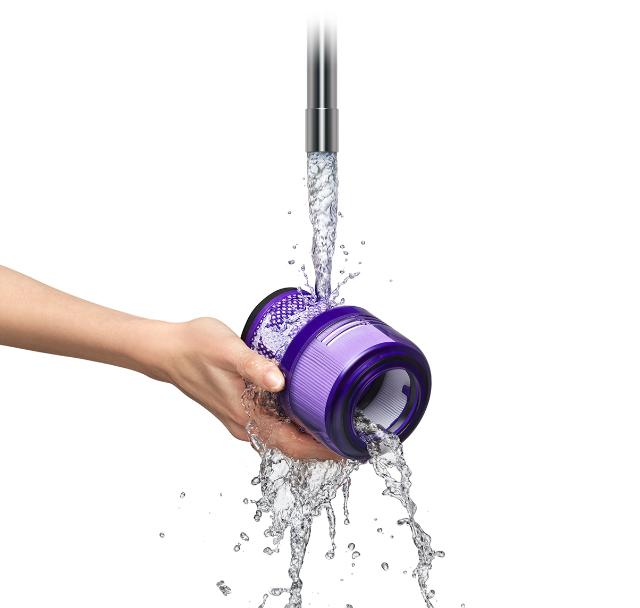
Wash the filters once a month to keep them clean. Follow these steps:
- Rinse each filter under cold water.
- Squeeze gently to remove excess water.
- Continue rinsing until the water runs clear.
Never use hot water or detergents. Let the filters air dry for 24 hours. Do not use a dryer or heater.
Reinstall the filters only when completely dry. This prevents mold and ensures optimal performance.
Clearing The Brush Bar
Keeping your Dyson vacuum’s brush bar clean is essential. It ensures optimal performance and prolongs the vacuum’s lifespan. This section will guide you through the process of clearing the brush bar.
Removing Hair And Debris
The brush bar often collects hair and debris. This can impede its functionality. Follow these steps to remove them:
- Turn off and unplug the vacuum.
- Lay the vacuum on its side.
- Locate the brush bar. It’s usually at the base.
- Use scissors to cut through tangled hair.
- Pull out the hair and debris with your hands.
- Use a soft cloth to wipe the brush bar.
Ensuring Smooth Rotation
A clean brush bar should rotate smoothly. If it doesn’t, follow these steps to ensure smooth rotation:
- Check for any remaining debris. Even small pieces can cause issues.
- Use a screwdriver to remove the brush bar if needed.
- Inspect the ends of the brush bar. Remove any obstructions.
- Lubricate the brush bar bearings if they appear dry.
- Reattach the brush bar. Ensure it clicks into place securely.
- Turn on the vacuum to test the rotation.
Keeping the brush bar clean ensures your Dyson vacuum works efficiently. Regular maintenance is key.
Inspecting The Hose And Attachments
Keeping your Dyson vacuum in top condition is important. A clean vacuum ensures strong suction power. Inspecting the hose and attachments is an essential step. This process helps you identify any issues. Follow the steps below to keep your vacuum working well.
Checking For Blockages
Blockages can reduce your vacuum’s efficiency. Check the hose and attachments for clogs.
- Turn off and unplug the vacuum.
- Detach the hose from the vacuum.
- Look through the hose for any visible blockages.
- Use a long object, like a broomstick, to push out any clogs.
- Inspect the attachments for any debris.
Removing blockages ensures better performance and longevity.
Washing And Drying Attachments
Clean attachments improve your vacuum’s effectiveness. Regular washing is key.
- Detach all attachments from the vacuum.
- Fill a sink with warm, soapy water.
- Submerge the attachments and scrub them gently.
- Rinse the attachments thoroughly with clean water.
- Place the attachments on a towel to dry completely.
Make sure the attachments are fully dry before reattaching them. This prevents mold and damage.
Wiping Down The Vacuum Exterior
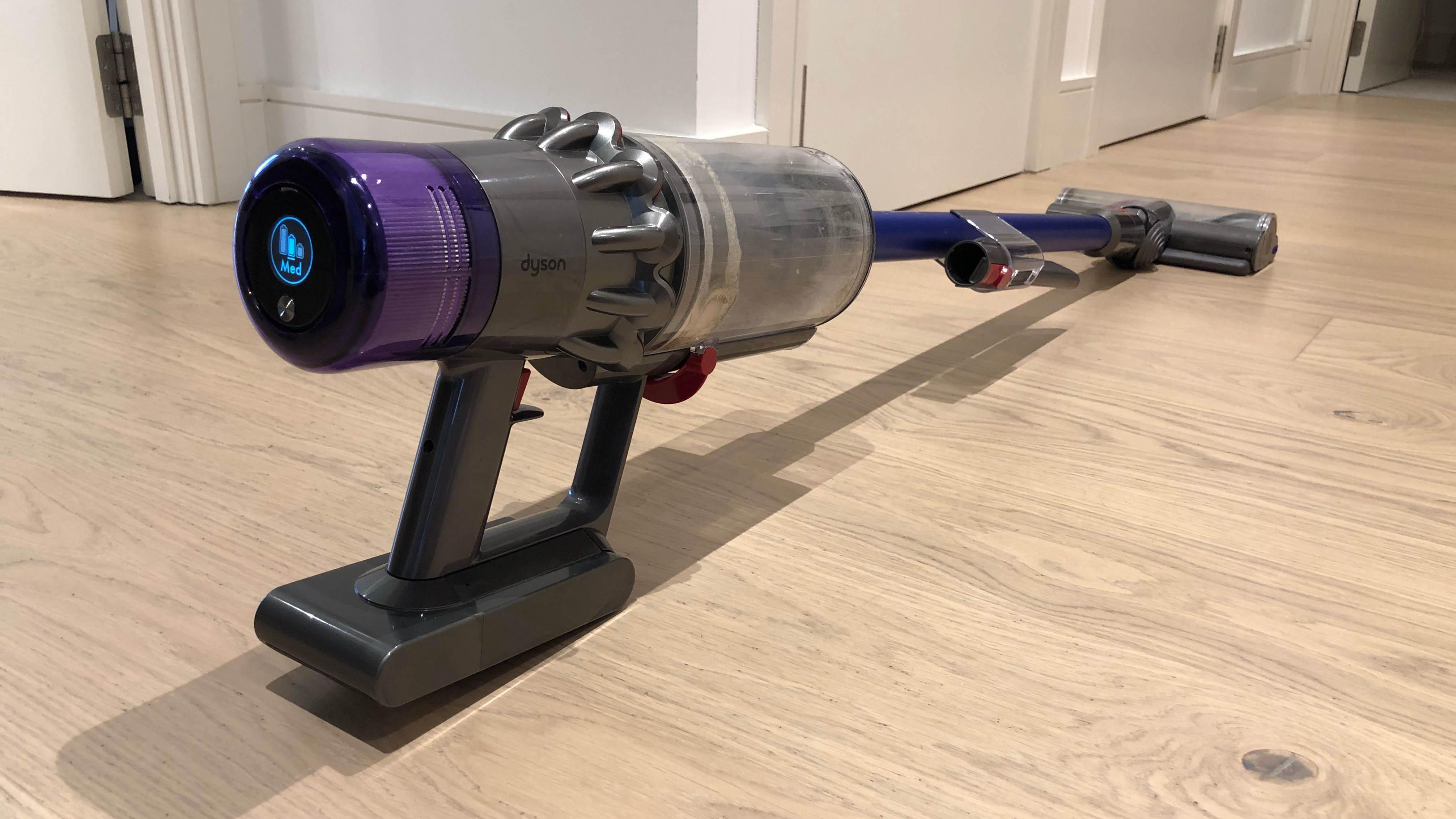
Keeping the exterior of your Dyson vacuum clean is essential. It maintains the vacuum’s appearance and ensures longevity. Dust, dirt, and grime can accumulate over time. Regularly wiping down the exterior keeps your vacuum in top condition.
Choosing The Right Cleaning Solutions
Select a gentle, non-abrasive cleaner. Harsh chemicals can damage the vacuum’s surface. A mild dish soap mixed with water works well. Avoid bleach or alcohol-based cleaners. These can cause discoloration or damage plastic parts.
| Cleaning Solution | Safe for Vacuum |
|---|---|
| Mild Dish Soap | Yes |
| Bleach | No |
| Alcohol-based Cleaners | No |
Technique For A Streak-free Finish
Use a soft microfiber cloth. Dip it in the soapy water solution. Wring out excess water before wiping the vacuum. Wipe in gentle, circular motions. This helps to avoid streaks and ensures all dirt is removed.
After wiping, use a clean, dry cloth. Buff the surface to a streak-free finish. Pay attention to crevices and edges. These areas often trap more dirt.
- Use microfiber cloth
- Wipe in circular motions
- Buff with dry cloth
Reassembling Your Dyson Vacuum
After a thorough cleaning, reassembling your Dyson vacuum is crucial. Correct assembly ensures optimal performance. Follow these steps to put your Dyson back together.
Correct Order Of Assembly
Reassembling your Dyson vacuum in the correct order is essential. Follow the steps below:
- Attach the bin: Align the bin with the main body. Push it until it clicks.
- Insert the filter: Place the filter back into its slot. Ensure it fits snugly.
- Connect the wand: Attach the wand to the main unit. Secure it by pushing firmly.
- Attach the cleaning head: Connect the cleaning head to the wand. Push until you hear a click.
Ensuring Everything Is Secure
It’s vital to ensure every part is securely attached. This prevents any issues during use.
- Check the bin: Ensure the bin is locked in place. It should not move.
- Inspect the filter: Make sure the filter is seated correctly. No gaps should be visible.
- Verify the wand connection: The wand should be firmly attached. It should not wobble.
- Test the cleaning head: The cleaning head should be securely in place. It should not come off easily.
By following these steps, you ensure your Dyson vacuum is reassembled correctly. Proper assembly ensures your vacuum works efficiently.
Post-cleaning Function Check
After cleaning your Dyson vacuum, it’s important to ensure it’s working correctly. A post-cleaning function check helps verify the cleaning success and the vacuum’s optimal performance.
Testing Suction Power
First, turn on your Dyson vacuum. Place your hand near the nozzle. Feel the suction power. It should be strong and consistent. If the suction seems weak, check for blockages. Ensure the filters are properly installed. Clean or replace filters if needed.
Listening For Unusual Noises
Next, listen carefully as the vacuum runs. A well-maintained Dyson should sound smooth. Unusual noises like rattling or whining indicate issues. Check the brush bar and remove any debris. Ensure all parts are securely attached. If noises persist, consult the user manual or contact support.
Troubleshooting Common Issues
Dyson vacuums are powerful and efficient, but sometimes they face issues. Knowing how to troubleshoot these problems can save time and money. Below are some common problems and how to fix them.
When To Seek Professional Help
Sometimes, a vacuum needs expert care. If your Dyson makes strange noises, it could mean a broken part. If the vacuum smells like burning, unplug it immediately. These issues need professional help.
A vacuum that doesn’t turn on at all could have electrical problems. Electrical issues are dangerous to fix at home. If your vacuum won’t charge, the battery might be dead. Replacing the battery is tricky and best left to experts.
Diy Fixes For Minor Problems
Many Dyson issues can be fixed at home. Follow these simple steps to solve minor problems.
- Clogged Hose: Check for blockages in the hose. Remove any debris carefully.
- Dirty Filter: A dirty filter reduces suction. Clean or replace the filter regularly.
- Brush Bar Not Spinning: Hair and threads can wrap around the brush bar. Cut them away with scissors.
If the vacuum loses suction, inspect the airways for blockages. Make sure all parts are connected properly. A loose part can reduce suction power.
For minor electrical issues, check the power cord for damage. If you see any cuts or frays, do not use the vacuum. Replace the cord or seek professional help.
Regular maintenance can prevent many common issues. Empty the dustbin before it gets too full. Clean the filter every month.
Maintenance Schedule And Tips
Keeping your Dyson vacuum clean ensures it performs at its best. Regular maintenance helps extend its life. Follow these tips and schedules to keep your Dyson in top condition.
Creating A Cleaning Routine
Establishing a regular cleaning routine for your Dyson vacuum is essential. Here’s a simple guide:
- Weekly: Empty the dust bin and check for blockages.
- Monthly: Wash the filters and let them dry completely.
- Every 6 months: Inspect and clean the brush bar and hoses.
Maintaining this routine prevents clogs and keeps your vacuum efficient.
Longevity Tips For Your Dyson
Follow these tips to make your Dyson last longer:
- Don’t overfill the dust bin: Empty it when it reaches the max line.
- Use the correct attachments: Each tool is designed for specific tasks.
- Store your vacuum properly: Keep it in a dry, cool place.
Proper care and usage ensure your Dyson stays in good shape.
Here’s a quick reference table for your Dyson maintenance schedule:
| Task | Frequency |
|---|---|
| Empty Dust Bin | Weekly |
| Wash Filters | Monthly |
| Clean Brush Bar | Every 6 months |
Stick to these schedules and tips to keep your Dyson running smoothly.
Frequently Asked Questions
What Is The Best Way To Clean A Dyson Vacuum?
To clean a Dyson vacuum, first unplug it. Empty the bin, wash filters, and check for blockages. Dry filters before reassembling.
Can You Take Apart A Dyson Vacuum To Clean It?
Yes, you can take apart a Dyson vacuum to clean it. Follow the user manual for detailed steps.
How Do I Clean The Dirt Out Of My Dyson Vacuum?
To clean dirt from your Dyson vacuum, empty the bin, remove and wash filters, and check for blockages. Regular maintenance ensures optimal performance.
How Do I Clean And Remove My Dyson Filter?
To clean your Dyson filter, remove it from the vacuum. Rinse under cold water until clear. Let it air dry for 24 hours before reinserting. Do this every 1-3 months for optimal performance.
Conclusion
Regular maintenance keeps your Dyson vacuum running efficiently. Follow these steps to ensure optimal performance. Clean filters, empty the bin, and check for blockages. Proper care extends the lifespan of your vacuum. With regular cleaning, your Dyson will continue to provide powerful suction and spotless floors.
Keep your home clean and your Dyson in top shape.