
If you’re tired of your Bissell Pet Hair Eraser Handheld losing its power or getting clogged, you’re not alone. Keeping your vacuum clean is key to making sure it works like new every time.
In this guide, you’ll discover simple, step-by-step tips to clean your device quickly and easily. By following these easy tricks, you’ll save time, avoid frustration, and keep your home free of pet hair. Ready to get your vacuum running at its best again?
Let’s dive in.
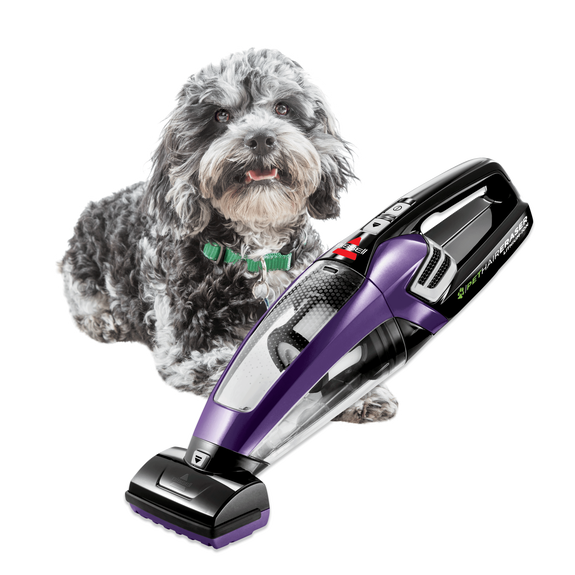
Preparing Your Bissell Pet Hair Eraser
Cleaning your Bissell Pet Hair Eraser starts with good preparation. Taking time to get ready helps make the process smooth and easy. A well-prepared cleaner lasts longer and works better.
Before you begin, organize your space and gather all needed items. This saves time and prevents frustration. Also, follow safety steps to protect yourself and the machine.
Gathering Necessary Supplies
Collect all tools and materials before cleaning. You will need a soft brush to remove hair and dust. A small screwdriver may help open parts. Have a clean cloth ready to wipe surfaces. Some mild detergent can help clean sticky spots. Keep a bowl of warm water nearby for rinsing. Use a vacuum or compressed air to clear dust from tight areas.
Safety Precautions Before Cleaning
Unplug the handheld vacuum before cleaning any parts. This stops accidental starts and electric shocks. Avoid using water on electrical parts. Wear gloves if you have sensitive skin or allergies. Work in a well-lit area to see all parts clearly. Do not force any parts open; check the manual if unsure. Let the vacuum cool down before starting to clean. These steps protect you and keep your vacuum safe.
Emptying The Dirt Tank
Emptying the dirt tank of your Bissell Pet Hair Eraser Handheld is essential for its best performance. A full tank can reduce suction power and make cleaning harder. Regularly removing and emptying the tank keeps the vacuum working efficiently. It also helps avoid bad smells and clogs. Follow these simple steps to empty the dirt tank properly.
Removing The Tank
First, turn off the vacuum and unplug it. Locate the dirt tank, usually near the handle. Press the release button or latch to detach the tank from the main body. Hold the tank over a trash bin to prevent mess. Be gentle to avoid breaking any parts. Set the vacuum aside while you empty the tank.
Proper Disposal Of Debris
Open the tank’s lid or bottom hatch carefully. Dump the dirt and pet hair into the trash. Tap the tank lightly to remove stuck debris. Avoid using water unless the manual says it is safe. Close the tank securely before reattaching it. Dispose of debris in a sealed trash bag to control dust and odors.
Cleaning The Filter
Cleaning the filter of your Bissell Pet Hair Eraser Handheld keeps the vacuum working well. The filter traps dust, hair, and debris. A dirty filter lowers suction and can damage the machine. Regular cleaning helps your vacuum last longer and clean better.
Locating The Filter
Find the filter inside the dustbin area. Open the dustbin by pressing the release button. The filter sits at the back or inside the bin. Some models have a foam filter, others a felt one. Check your user manual for the exact filter location.
Washing And Drying Tips
Remove the filter gently from the dustbin. Tap it lightly to remove loose dirt and hair. Rinse the filter under cold water only. Avoid using soap or cleaning agents. Do not wring or twist the filter to keep its shape.
Let the filter air dry completely. It may take 24 hours or more. Place it in a dry, well-ventilated spot. Do not use a dryer or direct sunlight. Only insert the filter back when fully dry to avoid damage.

Maintaining The Brush Roll
Maintaining the brush roll of your Bissell Pet Hair Eraser Handheld keeps it working well. The brush roll picks up pet hair and dirt. Over time, hair and debris can wrap around it. This can make the brush roll less effective. Regular cleaning helps the vacuum run smoothly and last longer.
Removing Hair And Debris
Turn off and unplug the vacuum before cleaning. Remove the brush roll cover carefully. Use scissors or your fingers to pull out hair wrapped around the brush. Clear any stuck dirt or debris from the bristles. Check both ends of the brush roll for tangled hair. Clean the brush roll fully to avoid damage and improve suction.
Checking For Wear And Tear
Look closely at the brush roll bristles. Are they worn down or missing? Check the ends for cracks or damage. A damaged brush roll can reduce cleaning power. Replace the brush roll if it shows signs of wear. Regular checks keep your vacuum in top condition and ready for pet hair cleanup.
Cleaning The Nozzle And Attachments
Cleaning the nozzle and attachments of your Bissell Pet Hair Eraser Handheld is important. Dirt and hair can build up and reduce suction power. Regular cleaning keeps your vacuum working well and extends its life.
Detaching Accessories
First, turn off the vacuum and unplug it. Remove the nozzle carefully by twisting or pulling it as shown in the manual. Take off all other attachments like brushes and crevice tools. Keep the parts separate to clean each one properly.
Wiping And Rinsing Techniques
Use a soft cloth or sponge to wipe dirt from the nozzle and attachments. For sticky or oily spots, dampen the cloth with warm water. Avoid soaking electrical parts. Rinse plastic attachments under running water to remove hair and dust. Let all parts dry completely before reattaching them to the vacuum.
Reassembling And Testing
After cleaning your Bissell Pet Hair Eraser Handheld, reassembling and testing it is vital. This step ensures your vacuum works well again. Careful reassembly keeps all parts functioning properly. Testing confirms the device runs smoothly and safely.
Putting Parts Back Together
Start by aligning the dustbin with the main body. Snap it gently into place. Reattach the filter securely to avoid air leaks. Place the brush roll back inside the vacuum head. Make sure it fits tightly and spins freely. Close the vacuum’s cover firmly until it clicks. Check all locks and clips to confirm they hold.
Running A Quick Performance Check
Plug in or charge your vacuum. Turn it on and listen for normal sounds. Watch the brush roll spin without stopping. Test suction by running it over a small pile of pet hair. If it picks up well, the vacuum is ready. If not, check for loose parts or blockages. Repeat the cleaning if needed for best results.
Tips For Regular Maintenance
Keeping your Bissell Pet Hair Eraser Handheld clean ensures it works well for a long time. Regular care stops dirt build-up and keeps the suction strong. Follow simple steps to maintain your vacuum. This saves time and avoids bigger problems later.
Establishing A Cleaning Schedule
Set a regular time to clean the vacuum parts. Empty the dirt bin after each use. Check the filter once a week and wash it if needed. Clean the brush roll every few days to remove hair and debris. A simple routine keeps the vacuum ready for pet hair.
Avoiding Common Issues
Do not let hair wrap tightly around the brush roll. It can cause the vacuum to stop working. Use scissors to cut tangled hair gently. Avoid using the vacuum on wet surfaces. Water can damage the motor and parts. Store the vacuum in a dry place to prevent rust and electrical issues.

Frequently Asked Questions
How Do I Clean The Bissell Pet Hair Eraser Handheld?
To clean, detach the dirt bin and filter. Empty debris into trash. Rinse the bin with water. Let it dry fully before reassembling.
How Often Should I Clean The Handheld Vacuum?
Clean the dirt bin and filter after every use. Regular cleaning ensures peak suction and longer device life.
Can I Wash The Filter Of The Pet Hair Eraser?
Yes, rinse the filter under cold water gently. Avoid using soap. Let it air dry completely before reinserting.
How Do I Remove Pet Hair From The Brush Roll?
Use scissors or your fingers to cut and pull trapped hair from the brush roll. Regularly check for buildup.
Conclusion
Cleaning your Bissell Pet Hair Eraser Handheld keeps it working well. Empty the dirt bin often to avoid clogs. Wash the filter gently with water and let it dry. Remove hair from the brush roll to keep it spinning. Regular care helps the vacuum pick up pet hair better.
Simple steps save time and keep your home cleaner. Small efforts make a big difference in your cleaning routine. Keep your vacuum ready for the next mess. Easy maintenance means a longer-lasting machine.