
To empty the Wyze Robot Vacuum, remove the dustbin from the vacuum and empty the contents into a trash bin. The Wyze Robot Vacuum simplifies home cleaning with its smart features and efficient design.
Keeping it in top condition requires regular maintenance, including emptying the dustbin. A full dustbin can reduce the vacuum’s performance and efficiency. Emptying the dustbin is quick and straightforward, ensuring your device continues to perform optimally. Regularly cleaning the dustbin also helps maintain air quality by preventing dust and allergens from recirculating into your home.
By following this simple step, you can extend the life of your Wyze Robot Vacuum and enjoy a cleaner living space.

Preparation
Proper preparation ensures a smooth process when emptying your Wyze Robot Vacuum. Follow these steps to get ready.
Gather Necessary Tools
Before you start, make sure you have the necessary tools:
- A clean cloth
- Trash bin or bag
- Optional: small brush for cleaning the dustbin
Ensure Vacuum Is Powered Off
Always power off the vacuum before emptying it. This prevents accidents.
- Press the power button to turn it off.
- Unplug it from the charger if connected.
With these steps, you are ready to empty your Wyze Robot Vacuum safely and efficiently.
Accessing The Dustbin
Maintaining your Wyze Robot Vacuum is easy. The most important step is emptying the dustbin. Let’s break down this task into simple steps. You will learn how to locate and remove the dustbin.
Locate The Dustbin
First, find your vacuum. Ensure it is turned off. Look at the back of the unit. You will see a small, rectangular compartment. This is the dustbin.
Remove The Dustbin
Press the release button. This button is usually located above the dustbin compartment. Gently pull the dustbin out. Be careful not to spill any debris.
| Steps | Actions |
|---|---|
| 1 | Turn off the vacuum |
| 2 | Locate the dustbin |
| 3 | Press the release button |
| 4 | Remove the dustbin |
After removing the dustbin, empty its contents into a trash bin. Make sure to tap it gently to clear out all debris. Then, slide the dustbin back into the vacuum until it clicks.
Regularly emptying the dustbin will help your vacuum perform better. Keep your home clean by following these simple steps.
Emptying The Dustbin
Keeping your Wyze Robot Vacuum running smoothly is essential. Regularly emptying the dustbin helps maintain its efficiency. Here’s a step-by-step guide on how to empty the dustbin.
Dispose Of The Debris
- First, turn off the vacuum.
- Press the release button to remove the dustbin.
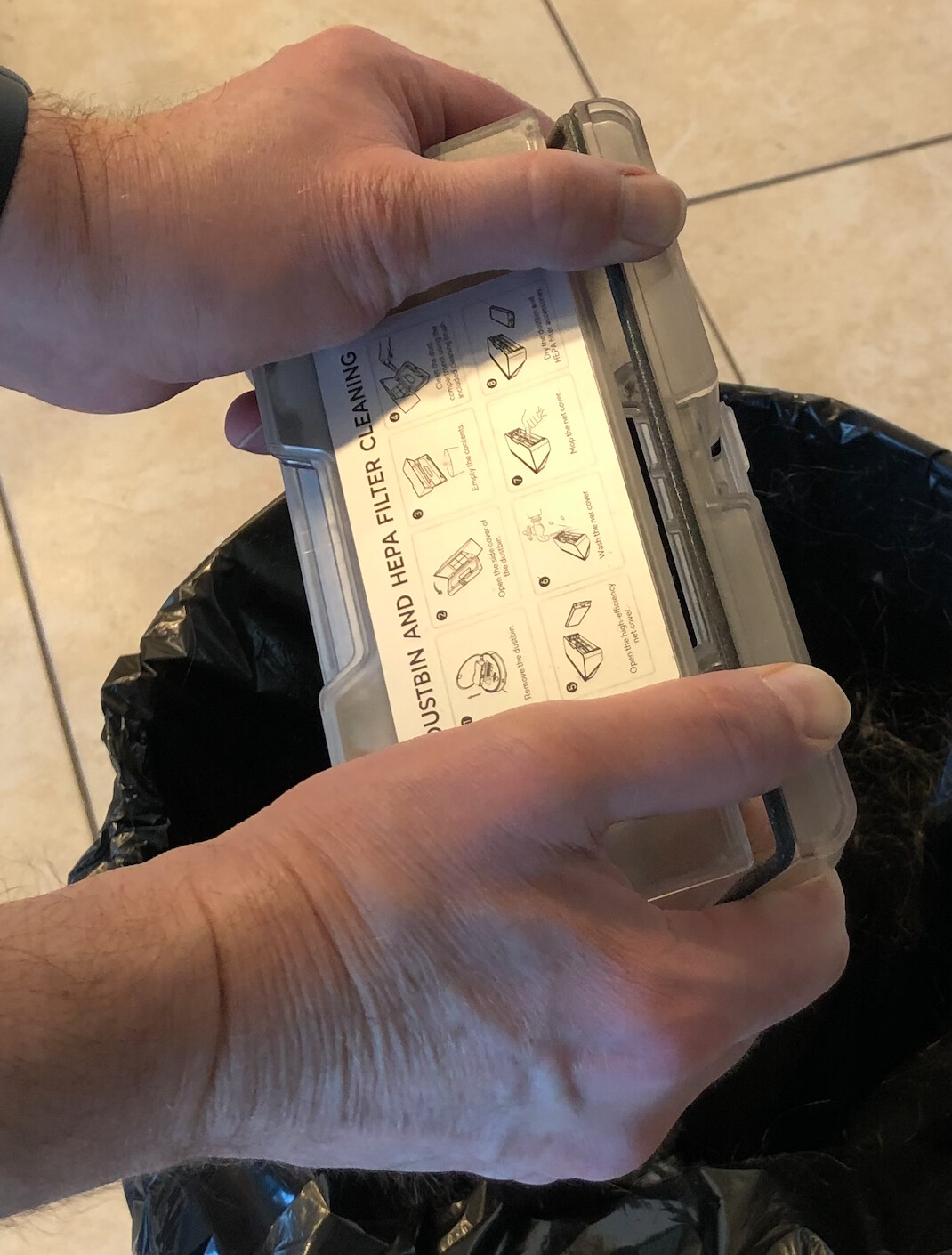
- Hold the dustbin over a trash can.
- Open the dustbin lid and let the debris fall out.
- Shake it gently to ensure all dirt is out.
Clean The Dustbin
Once the debris is out, you should clean the dustbin.
- Use a dry cloth to wipe the inside.
- If needed, use a damp cloth for stubborn dirt.
- Ensure the dustbin is completely dry before reattaching.
Regularly cleaning the dustbin keeps your vacuum working well. Maintaining cleanliness helps improve its lifespan and performance.
Cleaning The Filter
Maintaining your Wyze Robot Vacuum’s filter ensures optimal performance. A clean filter helps the vacuum pick up more dirt and dust, prolonging its life. Follow these simple steps to clean the filter efficiently.
Remove The Filter
First, turn off the Wyze Robot Vacuum. Locate the dustbin at the back of the vacuum. Press the release button and pull out the dustbin. Inside the dustbin, find the filter compartment. Open it and carefully remove the filter.
Wash And Dry The Filter
Rinse the filter under cold water to remove dust. Avoid using soap or chemicals. Gently shake off excess water. Place the filter on a towel and let it air dry. Ensure the filter is completely dry before reinserting it. This prevents mold and damage.
Reinsert The Filter
Once the filter is dry, place it back into the filter compartment. Close the compartment securely. Insert the dustbin back into the vacuum. Ensure it clicks into place. Your Wyze Robot Vacuum is now ready for use.
Reassembling The Vacuum
After emptying your Wyze Robot Vacuum, reassembling it is crucial. Proper reassembly ensures optimal performance. Follow these steps to make sure everything is put back correctly.
Reinsert The Filter
First, locate the filter slot inside the vacuum. Slide the filter back into its slot firmly. Ensure it clicks into place. A properly seated filter traps dust and allergens.
Reattach The Dustbin
Next, pick up the dustbin. Align it with the vacuum’s body. Gently push the dustbin until you hear a click. This ensures the dustbin is securely attached. Double-check to avoid any gaps. A well-fitted dustbin helps maintain the vacuum’s suction power.
| Step | Description |
|---|---|
| 1 | Locate the filter slot |
| 2 | Insert the filter firmly |
| 3 | Align the dustbin |
| 4 | Push until it clicks |
Following these steps ensures your Wyze Robot Vacuum performs at its best. Proper reassembly keeps your home clean and dust-free.
Inspecting The Brushes
Inspecting the brushes of your Wyze Robot Vacuum is crucial. It ensures optimal cleaning performance. Regular inspection keeps the brushes free of debris. Follow these steps to inspect and clean your brushes effectively.
Check For Debris
First, turn off your Wyze Robot Vacuum. Safety is always a priority. Next, flip the vacuum over to access the brushes. Carefully examine the brushes for any visible debris. Look for hair, string, or other materials tangled in the bristles.
Use a small tool or your fingers to remove larger debris. Be gentle to avoid damaging the brushes. Inspect the brush ends where debris tends to accumulate. Removing debris ensures the vacuum runs smoothly.
Clean The Brushes
After removing debris, it’s time to clean the brushes. Use a brush cleaning tool if available. Run the tool along the bristles to dislodge smaller particles. Alternatively, a soft cloth can be used to wipe down the brushes.
For a deeper clean, you can wash the brushes. Remove the brushes from the vacuum. Wash them with mild soap and water. Rinse thoroughly and let them dry completely before reinstalling.
Regular cleaning prolongs the life of your brushes. It also ensures the Wyze Robot Vacuum performs at its best. Keep your brushes clean to maintain efficient cleaning.
Checking The Wheels
Ensuring your Wyze Robot Vacuum runs smoothly involves regular wheel checks. This helps prevent issues and maintains performance. Below are some steps to follow.
Inspect For Obstructions
First, turn your vacuum upside down. Look closely at the wheels. Check for any trapped objects like hair, thread, or small debris. These can block the wheels, causing the vacuum to malfunction.
Clean The Wheels
Use a small brush or your fingers to remove any debris. For stubborn dirt, you can use a damp cloth. Gently wipe the wheels until they are clean. Make sure they spin freely after cleaning.
For a visual guide, refer to the table below:
| Step | Action |
|---|---|
| 1 | Turn the vacuum upside down |
| 2 | Inspect for trapped objects |
| 3 | Remove debris with a brush or fingers |
| 4 | Wipe wheels with a damp cloth |
| 5 | Ensure wheels spin freely |
Follow these steps regularly to keep your Wyze Robot Vacuum in top condition. Proper wheel maintenance ensures smooth operation and extends the vacuum’s life.
Maintaining The Sensors
Maintaining the sensors of your Wyze Robot Vacuum is crucial. Clean sensors ensure the vacuum navigates efficiently. Dirty sensors can cause performance issues. Follow these simple steps to keep them in top shape.
Locate The Sensors
First, identify where the sensors are on your Wyze Robot Vacuum. You can find the sensors on the sides and bottom of the vacuum. They help in navigation and avoiding obstacles.
| Sensor Location | Function |
|---|---|
| Side Sensors | Avoid walls and furniture |
| Bottom Sensors | Detect drops and cliffs |
Clean The Sensors
Use a soft, dry cloth to clean the sensors. Avoid using water or harsh chemicals. Gently wipe each sensor to remove dust and debris.
- Turn off the vacuum before cleaning.
- Use a microfiber cloth for best results.
- Ensure you clean both side and bottom sensors.
Regular cleaning of sensors helps maintain optimal performance. Check and clean sensors once a week.
Software Updates
Keeping your Wyze Robot Vacuum up-to-date ensures it performs efficiently. Regular software updates can fix bugs, add new features, and enhance overall functionality. This section will guide you through the process of checking and installing these updates.
Check For Updates
First, you need to check if any updates are available. Follow these simple steps:
- Open the Wyze app on your smartphone.
- Navigate to the Device tab.
- Select your Wyze Robot Vacuum.
- Tap on the Settings icon.
- Look for the Firmware Version section.
If there is an available update, it will be listed here.
Install Necessary Updates
Once you have identified an available update, follow these steps to install it:
- Tap on the Update button next to the firmware version.
- Ensure your vacuum is connected to a stable Wi-Fi network.
- Keep the vacuum on its charging dock.
- Wait for the update to download and install.
The vacuum may restart during this process. Once completed, your Wyze Robot Vacuum will be up-to-date.
Regularly checking and installing updates ensures your vacuum operates at its best.
Storage Tips
Proper storage of your Wyze Robot Vacuum ensures its longevity and efficiency. Follow these storage tips to keep your device in top condition.
Choose An Appropriate Location
Finding the right location is vital for your vacuum’s storage. Select a spot that is dry and free from dust. Make sure the area is flat and stable. Avoid placing the vacuum near heat sources or in direct sunlight. This helps to prevent overheating and damage.
| Do | Don’t |
|---|---|
| Keep in a dry area | Avoid humid places |
| Place on a flat surface | Do not place near heat |
| Store away from sunlight | Avoid dusty areas |
Keep The Vacuum Charged
Maintaining the battery charge is crucial for your vacuum’s performance. Ensure the vacuum is charged before storing it. This prevents the battery from draining completely. It is advisable to store the vacuum near its charging dock. This makes it easy to charge when needed.
- Charge the vacuum before storage
- Store near the charging dock
- Avoid complete battery drain
By following these storage tips, you can keep your Wyze Robot Vacuum in excellent condition. This ensures it is always ready for its next cleaning task.

Frequently Asked Questions
How Do I Empty The Wyze Robot Vacuum?
To empty the Wyze Robot Vacuum, open the dustbin compartment. Remove the dustbin and empty its contents. Reinsert the dustbin securely.
How To Open Dustbin Wyze Robot Vacuum?
Press the button on top of the Wyze Robot Vacuum. Lift the dustbin out gently. Open the dustbin lid to empty.
How Do I Empty My Robot Vacuum?
To empty your robot vacuum, first, remove the dustbin. Open the dustbin lid and discard the debris. Reattach the dustbin securely.
How Do You Empty A 360 Robot Vacuum Cleaner?
To empty a 360 robot vacuum cleaner, remove the dustbin. Open the dustbin lid and discard the debris. Reattach the dustbin to the vacuum.
How Do You Empty Wyze Robot Vacuum?
To empty the Wyze Robot Vacuum, open the dustbin compartment and pull out the dustbin. Dispose of the debris.
Conclusion
Mastering how to empty your Wyze Robot Vacuum ensures it runs efficiently. Follow the steps for a clean home. Regular maintenance extends its lifespan. Make this a routine task to enjoy hassle-free cleaning. Keep your vacuum in top condition for optimal performance and a spotless living space.